Taming Enterprise ERP Integrations (like SAP Business One) in Laravel
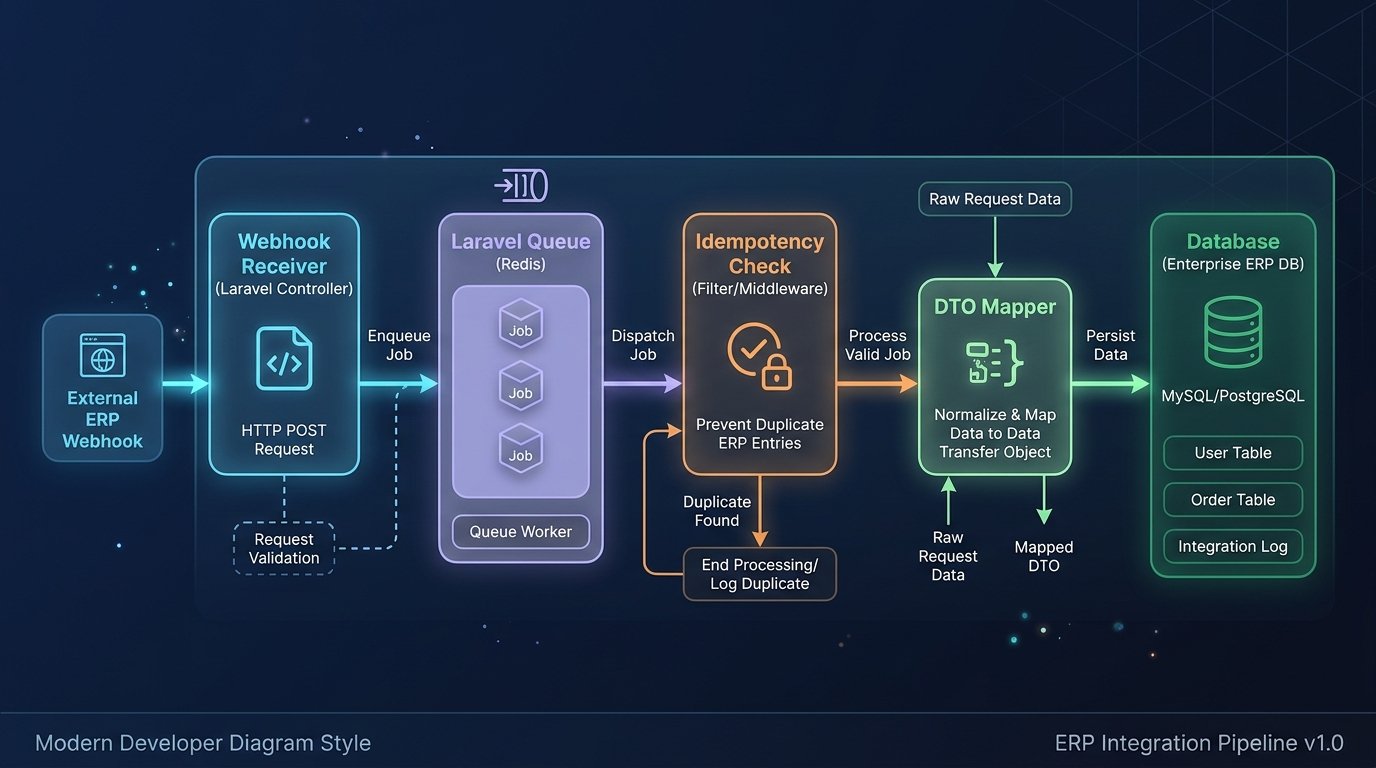
Integrating a clean Laravel application with an enterprise ERP like SAP Business One Service Layer rarely fails on the happy path. It fails at 2:00 AM when the ERP times out mid-sync, sends duplicate webhooks, changes a field from a string to null, or locks a record because an accountant has the invoice open on their desktop.
To survive third-party enterprise APIs, your integration layer needs four defensive boundaries.
1. Never Sync Inside the HTTP Request Lifecycle
Never call an ERP endpoint synchronously inside a user-facing controller. Instead, acknowledge the incoming webhook or user action immediately, store the raw payload in an integration_inbox table, and dispatch a queued job.
2. Enforce Idempotency Keys
Enterprise ERPs frequently retry webhooks if your server takes more than 3 seconds to respond. Without idempotency protection, you will create duplicate orders or double-post payments.
PHP Sample Code:
// Guard every inbound sync job with an atomic cache lock + processed log
$lockKey = "erp_sync:{$payload->entityType}:{$payload->externalId}";

Cache::lock($lockKey, 30)->block(5, function () use ($payload){
    if(IntegrationEvent::where('idempotency_key', $payload->eventId)->exists()){
        return; // Safely ignore duplicate delivery
    }

    DB::transaction(function() use ($payload){
        // Process mapping & persist
        IntegrationEvent::create(['idempotency_key' => $payload->eventId]);
    });
});
3. Quarantine Messy Schemas with Typed DTOs
Never pass raw associative arrays ($response['DocEntry']) deep into your Laravel services or Eloquent models. Translate external ERP payloads into strict, readonly PHP 8.3+ Data Transfer Objects (DTOs) at the edge of your application. If the ERP sends malformed data, the DTO fails fast before touching your database.
4. Exponential Backoff & Dead-Letter Visibility
Configure Laravel queue workers with explicit retry curves ($backoff = [10, 60, 300, 1800]) so temporary ERP maintenance windows resolve automatically without waking up engineers. Build a simple failed-event dashboard so operations teams can inspect payloads and click "Replay" once an ERP record lock is cleared.
Recent Posts

.jpg)
.jpg)
.jpg)